Tuesday Tech Tip - Using Browser Tab Groups

We've all been there, you have 30 open tabs - you don't want to close any of them, but its getting hard to manage.
Meet tab groups.
Tab groups are little known feature in modern web browsers (Chrome, Edge, Firefox, etc), that help you organize tabs.
The following is for Chrome, but the steps are very similar in other browsers
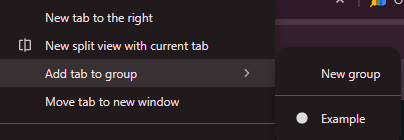
To use them, simply right-click on a tab, and select Add tab to new group. You can give groups different names and colors.

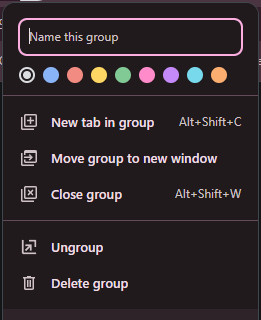
If you already have tab groups, it changes to Add tab to group, and will list all your groups to choose from.